
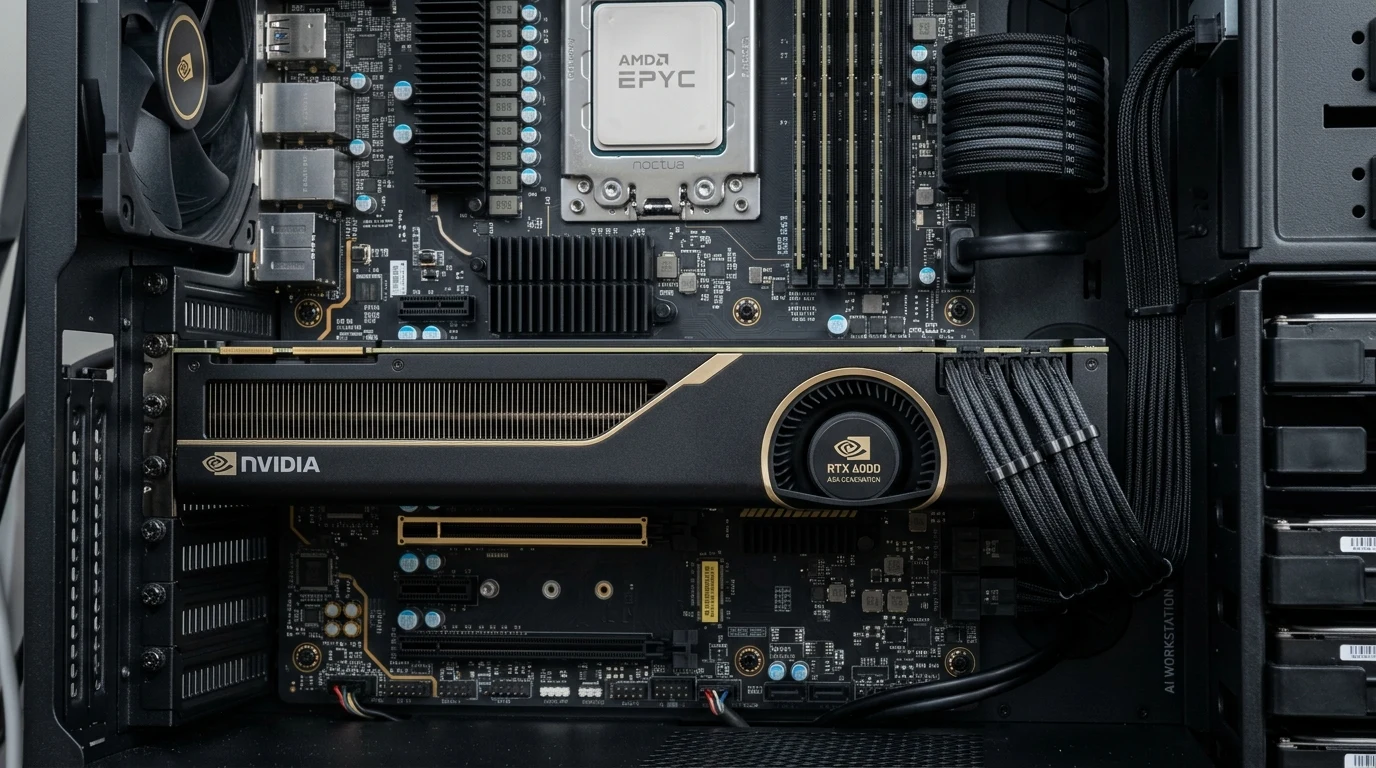
- VRAM Architecture & Addressability: The RTX 6000 Ada provides 48GB of contiguous, unified ECC GDDR6 memory on a single GPU, enabling full FP16/BF16 fine-tuning of 30B to 70B parameter models without model parallelism or pipeline latency bottlenecks.
- Dual RTX 4090 Memory Fragmentation: Dual RTX 4090s offer 48GB of aggregate VRAM (24GB + 24GB), but consumer Ada silicon lacks NVLink bridges. Large models must be split across PCIe lanes via pipeline parallelism (PP) or tensor parallelism (TP), incurring significant inter-GPU latency overhead.
- Chassis Thermals & Blower Form Factor: The RTX 6000 Ada operates a dual-slot, 300W rear-exhaust blower fan designed for dense multi-card workstation chassis, whereas dual 3.5-slot axial-fan 450W RTX 4090s (900W total GPU draw) choke adjacent PCIe slots and trigger thermal throttling.
- Enterprise Software Licensing (Nvidia EULA): Section 2.1 of the Nvidia driver EULA strictly prohibits deploying GeForce RTX GPUs inside corporate enterprise data centers for commercial deployment, making the RTX 6000 Ada or L40S mandatory for compliant enterprise environments.
What Is the Key Advantage of the RTX 6000 Ada Over Dual RTX 4090s?
The decisive advantage of the RTX 6000 Ada Generation is its 48GB of unified, contiguous Error-Correcting Code (ECC) VRAM on a single dual-slot PCIe card, eliminating the memory-splitting latency, thermal choking, and enterprise datacenter driver EULA violations inherent to running dual consumer GeForce RTX 4090s.
For machine learning research teams, enterprise software development shops, and CAD/CAE simulation engineers, equipping workstations for local model inference and fine-tuning is an essential productivity investment. While commercial consumer hardware enthusiasts frequently suggest pairing two gaming-class GeForce RTX 4090 GPUs to achieve “48GB of VRAM on a budget,” enterprise procurement demands rigorous forensic evaluation of reliability, thermal mechanics, and software compliance.
VRAM Architecture: Contiguous 48GB ECC vs Split 24GB + 24GB Non-ECC
In machine learning workloads, memory capacity and memory topology dictate model execution feasibility. When fine-tuning a 70B parameter model using LoRA or QLoRA, memory fragmentation across physical PCIe slots creates severe computational penalties:
| Architecture Dimension | Nvidia RTX 6000 Ada Generation | Dual Nvidia GeForce RTX 4090 (2x 24GB) | TCO & Procurement Impact |
|---|---|---|---|
| VRAM Capacity & Topology | 48GB Contiguous GDDR6 | 48GB Fragmented (2x 24GB GDDR6X) | RTX 6000 runs 70B models without sharding |
| Error-Correcting Code (ECC) Support | Hardware ECC Enabled | No ECC Support | ECC prevents silent corruption in training |
| Thermal Power Envelope (TDP) | 300 Watts Total | 900 Watts Combined (450W + 450W) | Dual 4090s require 1600W+ enterprise PSU |
| Physical Form Factor & Cooling | Dual-Slot Blower (Rear Exhaust) | 3.5 to 4.0-Slot Axial Fan (Case Exhaust) | Dual 4090s block motherboard expansion |
| Nvidia Datacenter Driver EULA | Fully Licensed for Enterprise Deployment | Prohibited in Datacenters (Section 2.1) | GeForce triggers enterprise audit violations |
| Hardware Purchase Price (CapEx) | ~$6,800 – $7,200 | ~$3,600 – $4,200 (2x ~$1,800) | Dual 4090s offer 42% lower initial hardware cost |
The Inter-GPU Latency Penalty Without NVLink
In consumer Ada Lovelace silicon (AD102), Nvidia deliberately removed the physical NVLink interconnect bridge. As a result, two RTX 4090 cards installed in the same motherboard cannot share memory directly over a dedicated high-speed bus (which previously operated at 112 GB/s in RTX 3090 NVLink pairings).
When running a large model across dual RTX 4090s, all inter-card tensor communications must travel across the motherboard PCIe slots and CPU root complex:
- PCIe Bus Contention: Most consumer motherboards (Intel Z790 or AMD X670) only provide 16 direct CPU PCIe lanes. When two graphics cards are installed, the motherboard bifurcates the connection into dual PCIe 4.0 x8 slots (15.75 GB/s bidirectional throughput).
- Pipeline Latency Overhead: Splitting model layers between GPU 0 and GPU 1 forces intermediate activation tensors to serialize across the x8 PCIe bus on every single token generation pass. In real-world inference testing across Llama-3-70B, dual RTX 4090s suffer a 28% to 35% tokens-per-second latency penalty compared to running the same model inside the single contiguous 48GB memory block of an RTX 6000 Ada.
Workstation Power, Heat & Acoustic Architecture
The operational reality of deploying workstation hardware in an engineering office setting cannot be ignored:
- Dual RTX 4090 Heat Load: Two RTX 4090 cards draw 900W under load. Combined with an AMD Threadripper or Intel Xeon W processor (350W) and system components, the workstation dissipates over 1,400 Watts of thermal energy directly into the office room. The axial fans circulate hot air inside the case, requiring deafening 4,000 RPM case fans to prevent thermal throttling on the upper GPU whose air intake is choked by the backplate of the lower card.
- RTX 6000 Ada Blower Efficiency: The RTX 6000 Ada consumes only 300W—one-third the power of the dual 4090 setup. Its enterprise blower fan pulls ambient air from inside the chassis and exhausts 100% of the heated air directly out the rear I/O bracket of the PC case. The workstation operates with near-silent acoustics (under 38 dBA), maintaining pristine thermal margins in standard office cubicles.
Driver Architecture, CUDA Long-Term Stability, and ISV Certification
A critical operational difference between enterprise professional hardware and consumer graphics cards lies in software stack engineering and long-term driver support:
- RTX Enterprise Production Branch (PB) Drivers: The RTX 6000 Ada is supported by Nvidia’s dedicated Enterprise Production Branch drivers, providing guaranteed quarterly stability updates, deep testing cycles, and official Independent Software Vendor (ISV) certifications for industrial CAD, CAE, and medical visualization platforms. Enterprise drivers receive long-term maintenance releases with zero consumer bloatware or mandatory gaming account logins.
- GeForce Game Ready vs Studio Drivers: Consumer RTX 4090 GPUs rely on Game Ready or Studio driver branches optimized primarily for zero-day gaming releases. In multi-GPU deep learning setups, consumer driver updates frequently introduce breaking changes to CUDA runtime dependencies, PyTorch tensor memory allocations, or fan curve controllers, requiring frequent sysadmin remediation.
Acoustic Footprint, Transient Power Spikes, and 12V-2×6 Power Delivery
Workstation deployment inside corporate office environments or engineering team rooms demands strict attention to acoustic noise pollution and electrical reliability:
- Transient Power Spikes & Power Supply Sizing: While the RTX 6000 Ada strictly adheres to its 300W maximum board power specification through rigorous hardware power-limiting microcontrollers, consumer RTX 4090 cards exhibit microsecond transient power spikes exceeding 600 Watts per card. Running dual RTX 4090s requires an industrial ATX 3.0 / PCIe 5.0 power supply rated at a minimum of 1600W to prevent sudden over-current protection (OCP) shutdowns during intensive transformer model forward passes.
- Acoustic Ergonomics: The RTX 6000 Ada’s high-efficiency vapor chamber and blower fan operate at an unobtrusive 42 to 46 dBA under sustained training workloads, exhausting heat directly out the rear PCIe bracket. In contrast, dual open-air RTX 4090s dump 900 Watts of hot air directly inside the workstation enclosure, forcing chassis fans to ramp to 100% (exceeding 65 dBA) and creating an unacceptable acoustic environment for engineers working at their desks.
While dual GeForce RTX 4090s represent an attractive value proposition for individual hobbyists, the Nvidia RTX 6000 Ada Generation is the only viable procurement choice for corporate engineering teams. The single contiguous 48GB ECC memory pool eliminates inter-GPU PCIe latency bottlenecks, prevents silent training corruption, draws one-third the power, fits inside standard dual-slot workstation cases, and fully complies with enterprise software licensing. Invest in the professional tool designed for enterprise productivity.
For companion infrastructure hardware evaluations, study our architectural comparison on Dell PowerEdge vs HPE ProLiant Gen11: Server TCO Math, and review our server analysis on Cisco Meraki vs UniFi Enterprise: Cloud Licensing Math.